Welcome Section

Welcome Section

The Eminent Law Theme allows you to create a compelling Welcome section on your page using a custom Gutenberg block. This section can feature a custom image, a heading, a subheading, and a description to provide visitors with a warm introduction to your website.
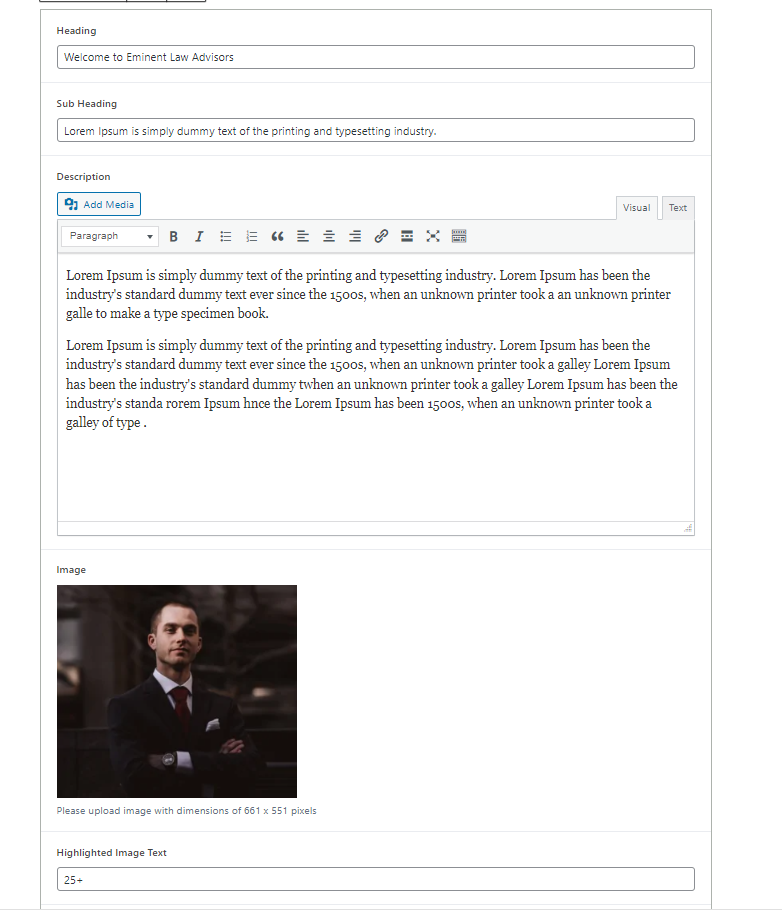

1. Add the Custom Welcome Block and Enter Content:

  • From the WordPress dashboard, go to ‘Pages‘ and select the page where you want to add the Welcome section or click ‘Add New‘ to create a new page.
  • In the page editor, click the ‘+‘ icon to add a new block, search for the “Welcome” block, and select it.
  • Within the Welcome block, upload a custom image that reflects your site’s theme and tone.
  • Enter the heading that will be displayed prominently in the section, followed by a subheading that provides additional context or emphasis.
  • Write a brief and engaging description that complements the heading and subheading, offering a warm and informative introduction to your site.

2. Customize and Publish

  • After adding all the content, review the layout and make any necessary adjustments to ensure it aligns with your design preferences.
  • Once satisfied, click ‘Publish‘ to make the Welcome section live on your page.
Wellcome Section Backend
Wellcome Section

By following these steps, you can effectively utilize the custom Welcome block to create an inviting and informative introduction for your visitors, enhancing the overall user experience on your site.

Did this answer your question?